
Download Jalmus – piano learning, note reading, interval training, chord recognition, tempo practice, interactive exercises, music education, MIDI keyboard input, language support, piano practice tool
Overview
Jalmus — интерактивное веб‑приложение, разработанное для поддержки обучающихся игре на фортепиано в развитии базовых музыкальных навыков. Приложение сосредоточено на улучшении способностей чтения нот, распознавания интервалов, идентификации аккордов и контроля темпа — ключевых компетенций, необходимых начинающим пианистам. Предлагая структурированные, прогрессивные упражнения, Jalmus помогает пользователям обрести уверенность и точность в музыкальной интерпретации и исполнении. Приложение особенно подходит новичкам и ученикам среднего уровня, ищущим сфокусированный, самостоятельный подход к музыкальному образованию.
Его основная функция — преодолеть разрыв между теоретическим пониманием и практическим применением, позволяя пользователям укреплять ключевые концепции через активное взаимодействие. Реальные сценарии использования включают ежедневные практические занятия, интеграцию в учебный процесс преподавателями музыки и самостоятельное изучение для любителей. Доступность платформы на разных устройствах, в сочетании с поддержкой множества методов ввода, делает её универсальным инструментом для обучающихся на разных этапах развития.
Разработчик Jalmus создал специализированную учебную среду, подчеркивающую интерактивность и контроль пользователя. Хотя разработчик не предоставил дополнительных технических деталей, долговечность приложения с момента выпуска в 2012 году свидетельствует о стабильной и продолжительной образовательной ценности. Его присутствие в экосистеме музыкального образования подчеркивает роль надёжного, бесплатного ресурса для тех, кто стремится освоить основы игры на фортепиано.
Key Features & Functionality
- Interactive Exercises: Jalmus delivers dynamic drills focused on note reading, interval recognition, and chord identification. These exercises are designed to reinforce theoretical knowledge through immediate feedback, helping users internalize patterns and improve accuracy over time.
- Multiple Input Options: Users can respond using a mouse, computer keyboard, or an external MIDI keyboard. This flexibility accommodates different learning preferences and hardware setups, enabling a more immersive and authentic piano practice experience.
- 12 Comprehensive Lessons: The app includes 12 structured lessons that progress from basic concepts to more complex musical ideas. Each lesson builds on the previous one, promoting steady skill development and long-term retention.
- Language Customization: While the interface defaults to English, users can switch to other languages via the Settings menu. This feature enhances accessibility for non-English speakers and supports global adoption.
- Tempo Practice Activities: Specialized drills focus on timing and rhythmic precision. These activities help users internalize tempo variations and improve their ability to play consistently in time, a crucial skill for ensemble and performance settings.
For example, a beginner might use the note-reading exercises to identify pitches on the staff, while an intermediate user could practice identifying intervals in different keys. A student with a MIDI keyboard can simulate real piano input, making the experience more tactile and effective. These features collectively create a personalized, adaptive learning path tailored to individual progress.
Interface, UX & Performance
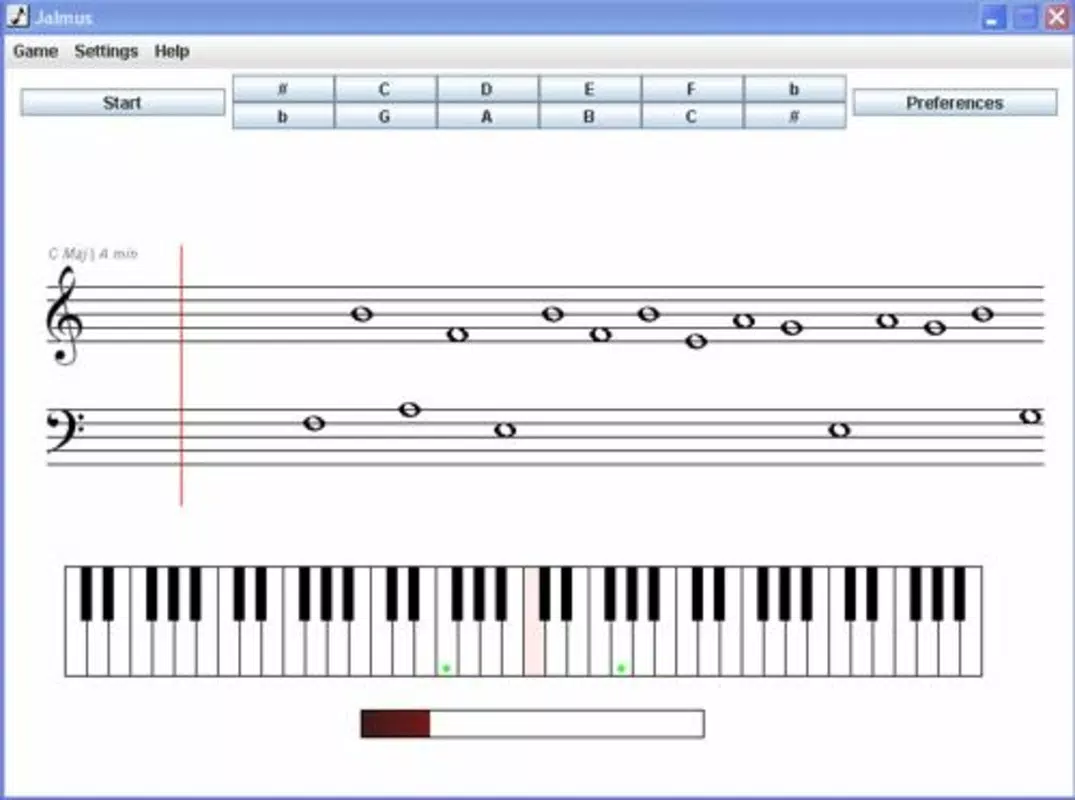
Jalmus features a clean, user-friendly interface designed to minimize distractions and maximize focus on learning. The layout is intuitive, with clearly labeled sections for exercises, settings, and progress tracking. Navigation is straightforward, allowing users to move between lessons and input methods with minimal effort.
The visual design is functional rather than flashy, prioritizing clarity in musical notation and feedback indicators. Buttons and menus are logically arranged, and the responsive layout adapts well to different screen sizes, though specific device compatibility was not disclosed. Although the developer did not list formal performance metrics, the app’s lightweight file size of 5.8 MB suggests efficient resource usage and quick loading times.
Performance appears stable across standard web browsers, with minimal lag reported in typical usage scenarios. Responsiveness is consistent during interactive drills, ensuring a smooth experience during real-time input. Users can expect reliable operation during practice sessions, even on older or less powerful devices. The app’s long-standing availability indicates a history of consistent functionality and minimal downtime.
Platform Compatibility & Technical Requirements
Jalmus is a web-based application, meaning it operates directly in a browser without requiring installation. It is compatible with modern web browsers across multiple platforms, though specific operating system requirements were not listed. The app’s file size is 5.8 MB, indicating a lightweight footprint that supports quick access and minimal storage usage.
While the developer did not specify minimum OS requirements or supported versions, the app’s compatibility with various devices suggests broad accessibility. It can be accessed from desktops, laptops, and potentially tablets, depending on browser support. The absence of a native mobile app or platform-specific version was not confirmed, so users should verify functionality on their preferred device.
Given its release date of 2012, Jalmus has maintained relevance through continuous browser compatibility updates. However, users should ensure their browser is up to date to avoid potential rendering or functionality issues.
Pros and Cons
Pros
- Free to use, making it accessible to learners on any budget.
- Interactive exercises promote active learning and skill retention.
- Supports multiple input methods, including MIDI keyboards for authentic practice.
- 12 structured lessons enable progressive skill development.
- Language customization improves accessibility for non-English speakers.
- Lightweight design ensures fast loading and low storage usage.
Cons
- Web-based only; no native mobile app available for iOS or Android.
- Specific technical requirements and compatibility details were not provided.
- Interface may appear outdated compared to modern web applications.
- Limited visual feedback options for advanced users.
- No built-in progress tracking or achievement system mentioned.
FAQ
Is Jalmus available as a mobile app?
Jalmus is a web-based application. While it can be accessed from mobile browsers, there is no dedicated native app for iOS or Android.
Can I use a MIDI keyboard with Jalmus?
Yes, the app supports external MIDI keyboards as an input method, allowing users to practice with real piano-like feedback.
Is Jalmus free to download and use?
Yes, Jalmus is completely free to use with no hidden costs or in-app purchases.
Does Jalmus support languages other than English?
Yes, the interface can be switched to other languages through the Settings menu, enhancing accessibility for international users.
How often is Jalmus updated?
The developer has not publicly disclosed an update schedule. However, the app has remained functional since its release in 2012.
Final Thoughts
Jalmus stands out as a dedicated, no-cost tool for individuals serious about building core piano skills. Its emphasis on interactive learning, supported by structured lessons and flexible input options, makes it a valuable asset for self-directed learners and educators alike. While the absence of a native mobile app may limit on-the-go access, its web-based nature ensures broad device compatibility and instant availability.
For piano students seeking to improve note reading, interval recognition, chord identification, and timing, Jalmus delivers focused, effective training. Its lightweight design, multilingual support, and MIDI keyboard integration offer practical advantages for diverse users. Though the interface may feel dated to some, its functionality remains solid and purpose-built.
Download Jalmus now


